Make a purchase
Make a purchase
NewRich allows you to unlock premium content directly from creators. Depending on what a creator offers, you can purchase individual products or gain access through a subscription.
Premium content on NewRich includes courses, apps, downloadable files, PDFs and e-books, paid posts, groups, livestreams, bundles, and creator subscriptions.
- Apps
- Courses
- Downloadable Files
- PDFs & E-books
- Paid Posts
- Bundles
- Paid Groups
- Subfeed Subscriptions
Some content can be purchased with a one-time payment, while other content is unlocked through an active Subscription.
Choose How to Unlock the Product
You can purchase products from several places across NewRich, including:
- Marketplace
- Creator profiles
- Posts in your feed
Creators can offer the same product in different ways. Depending on the creator's settings, you may see one or more purchase options.
- Lifetime Access — Pay once for permanent access to the selected product. Once purchased, the content remains available permanently without additional payments.
- Recurring Access — Pay a monthly subscription to keep access to the selected product. Your access remains active as long as your subscription is active.
- Subfeed Subscription — Some creators also offer a Subfeed Subscription, which unlocks their premium creator subfeed instead of a single product. A Subfeed Subscription may include:
- Subscriber-only posts
- Exclusive creator updates
- Premium content published in the subfeed
- Subscriber discussions
- Additional member-only benefits
Content included in a Subfeed Subscription is available while your subscription remains active.
- Bundle — Some products are also included in a discounted bundle that contains multiple products. If available, you can choose the bundle instead of purchasing the product individually.
Discounts and Promotions
Before completing your purchase, any available promotions are automatically applied.
Depending on the creator, you may see:
- Discount codes
- Limited-time offers
- Sale prices
- Bundle savings
Any available discount is applied before payment is completed.
Complete Your Payment
Once you've selected your preferred access option, choose a payment method and confirm your purchase.
NewRich supports multiple payment methods, including credit or debit cards, PayPal, bank transfer, and other regional payment options where available.
After a successful payment, your purchase is unlocked immediately and becomes available in your account.
- Credit or Debit Card
- PayPal
- Bank Transfer
- Other payment methods available in your region
Once your payment is successfully processed, your purchase is unlocked immediately.
Access Your Purchase
Purchased content is automatically added to the appropriate section of your account based on its type.
Depending on the product type, you can access it from:
| Product | Where to find it |
|---|---|
| Course | Marketplace → My Products or creator profile |
| App | Marketplace → My Products |
| Downloadable File | Marketplace → My Products |
| PDF / E-book | Marketplace → My Products |
| Group | Your Groups |
| Subscription | My Subscriptions |
| Paid posts | My Subscriptions |
Managing Your Purchases
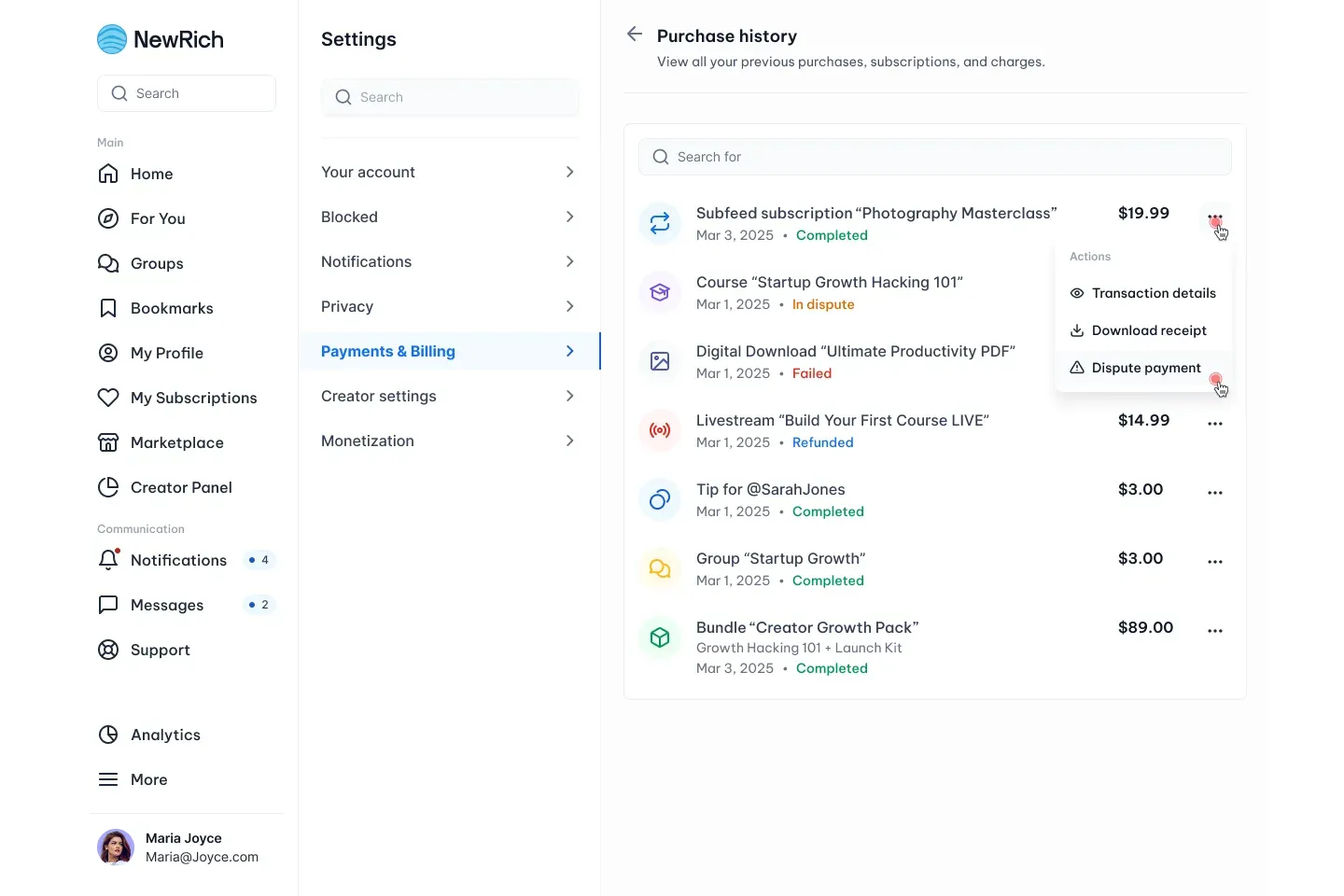
You can view all of your purchases at any time by going to:
Settings → Payments & Billing → Purchase History
The Purchase History page displays every completed purchase, including courses, apps, downloadable files, groups, subscriptions, and other paid content.
For each purchase, you can:
- View Transaction Details to see payment information, purchase date, amount, payment method, and transaction status.
- Download Receipt for your records or reimbursement purposes.
- Dispute Payment if you believe there is an issue with a transaction or need to request payment assistance.
The Purchase History page provides a complete record of your transactions, making it easy to manage and review all of your purchases in one place.